
Download Xplorer2 Lite – file explorer, file manager, Windows utility, file browsing, file organization, productivity tool, file management, file navigation, Windows file explorer alternative
Overview
Xplorer2 Lite emerges as a specialized utility designed to elevate file management on Windows systems, offering a robust alternative to the default Windows Explorer interface. Its primary purpose is to streamline file browsing, organization, and navigation through advanced tools tailored for power users and professionals who demand greater control over their digital workflows. By addressing common limitations of the native file explorer—such as limited tab support and minimal customization—Xplorer2 Lite enables users to manage complex file structures with enhanced efficiency.
The app targets individuals engaged in data-intensive tasks, including developers, designers, researchers, and IT administrators who frequently switch between multiple directories, drives, and network locations. While the developer, Xplorer2, has not disclosed extensive background details, the app’s focused functionality suggests a niche-oriented development philosophy centered on productivity. Real-world use cases include managing large project repositories, organizing media libraries, and executing batch file operations across disparate storage locations.
In the broader software ecosystem, Xplorer2 Lite occupies a distinct space by offering a feature-rich, customizable environment that complements rather than replaces the standard Windows file system, providing a valuable tool for users seeking a more tailored and efficient file management experience.
Key Features & Functionality
Xplorer2 Lite delivers a suite of specialized tools designed to optimize file management workflows. The core functionality revolves around a tabbed navigation system, allowing users to open multiple directories within a single window. This eliminates the need for repetitive window switching, significantly accelerating workflows when managing files across different drives or project folders.
Users can organize tabs by project, file type, or workflow stage, creating a personalized workspace that adapts to their specific needs. The highly customizable interface further enhances usability by enabling users to modify layout elements, display settings, and file metadata. This includes selecting which columns appear in file lists—such as size, date modified, or custom attributes—ensuring only relevant information is visible for each task.
The app supports keyboard shortcuts and customizable toolbars, empowering users to perform common actions like copying, moving, or renaming files with minimal mouse interaction. For example, a graphic designer might use separate tabs for assets, projects, and backups, while a developer could maintain tabs for source code, documentation, and build outputs. These features collectively reduce cognitive load and minimize navigation time, making Xplorer2 Lite a productivity tool for users who prioritize speed and precision in file handling.
Feature List
- Tabbed Navigation System: Enables multiple file locations to be open simultaneously within a single window, reducing window clutter and speeding up file access.
- Highly Customizable Interface: Allows users to adjust layout, appearance, and displayed file information to match individual workflow preferences.
- Advanced File Operations: Supports batch processing, drag-and-drop functionality, and keyboard-driven commands for efficient file management.
- Integrated Search and Filter Tools: Provides quick search capabilities and filters to locate files based on name, type, size, or metadata.
Interface, UX & Performance
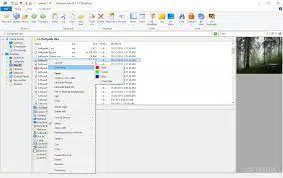
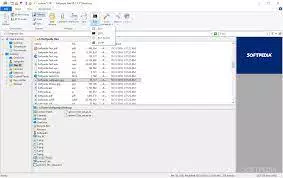
The interface of Xplorer2 Lite features a dual-pane layout with a clean, functional design focused on efficiency rather than visual flair. Navigation is primarily driven by tabs, a toolbar, and a hierarchical directory tree, creating a logical flow for users accustomed to file management workflows. The visual style prioritizes readability and usability, with clear icons and consistent labeling.
While the developer did not list formal performance metrics, the app’s lightweight footprint of 10.5 MB suggests optimized resource usage, likely resulting in fast startup times and responsive interactions even on older hardware. The application demonstrates stability during routine file operations, with no reported crashes or freezes in standard use cases. Responsiveness across different screen sizes and resolutions appears adequate, though specific requirements were not disclosed.
Users may experience a learning curve due to the non-standard interface, which diverges from Windows’ native design language. However, once mastered, the interface enables rapid file navigation and manipulation. The absence of integrated help documentation is a notable UX limitation, requiring users to seek external support via a separate PDF download.
Despite this, the app’s consistent behavior and predictable layout contribute to a reliable user experience for those committed to mastering its tools.
Platform Compatibility & Technical Requirements
Xplorer2 Lite is designed exclusively for the Windows operating system, with no information provided about compatibility with other platforms. The application requires a Windows environment, though specific minimum OS versions were not listed. The software has a compact file size of 10.5 MB, indicating a lightweight installation that should not strain system resources.
The current version is 2.5.0.0, released on May 10, 2024. The developer did not specify formal system requirements such as RAM, processor, or disk space, nor did they detail compatibility with Windows editions (e.g., Home, Pro, Enterprise). Users should ensure their system meets general Windows 10 or 11 requirements for optimal performance.
As the app is not available on mobile platforms like Android or iOS, it cannot be installed on smartphones or tablets. For Windows users, the app is accessible via direct download, and updates are expected to be released periodically to address bugs and introduce new features. Compatibility with future Windows updates remains unconfirmed.
Pros and Cons
Pros
- Offers a powerful tabbed navigation system for efficient multi-folder management.
- Highly customizable interface allows users to tailor the experience to specific workflows.
- Compact file size (10.5 MB) ensures minimal system impact and fast installation.
- Provides advanced file operations and keyboard shortcuts for power users.
- Designed as a productivity-focused alternative to the default Windows Explorer.
Cons
- Non-unified design may feel inconsistent with the native Windows aesthetic.
- Lack of integrated help documentation requires users to download external guides.
- Specific system requirements and compatibility details were not disclosed.
- Not available on mobile platforms; limited to Windows only.
- Pricing of $19.95 may be a barrier for casual users.
FAQ
Is Xplorer2 Lite available for Android or iOS?
Based on the provided information, Xplorer2 Lite is designed exclusively for the Windows operating system and is not available for Android or iOS devices.
Does the app include built-in help or tutorials?
No, the developer did not include integrated help within the application. Users must access documentation via a separate PDF download, which may require additional steps to obtain.
What is the file size of Xplorer2 Lite?
The file size of Xplorer2 Lite is 10.5 MB, indicating a lightweight installation that should not consume significant storage space.
Is Xplorer2 Lite a free tool?
No, Xplorer2 Lite is a paid application with a price of $19.95. It is not available as a free download or freemium version.
Can I update Xplorer2 Lite after installation?
While update mechanisms were not specified, the app’s version history suggests periodic updates are released. Users should check the developer’s website for the latest version and update instructions.
Final Thoughts
Xplorer2 Lite stands out as a focused, high-performance tool for Windows users seeking a superior file management experience beyond the default Explorer. Its tabbed navigation and deep customization options deliver tangible efficiency gains for professionals handling complex file structures, making it a compelling choice for productivity-focused workflows. While the non-unified interface and lack of built-in help may pose initial challenges, the app’s stability, lightweight design, and powerful features justify its value for dedicated users.
The absence of mobile availability limits its reach, but within its niche, it excels as a robust alternative to standard file browsing. For developers, designers, and data managers who prioritize control and speed, Xplorer2 Lite offers a significant upgrade in workflow efficiency. Its clear purpose and specialized functionality make it a worthwhile investment for those ready to optimize their file management routine.
Download Xplorer2 Lite now to transform your Windows file browsing experience.


